These instructions will help you prepare an observing plan for exoplanet transits. We will use TOPCAT to search the NASA Exoplanet Archive, identify promising targets, and determine when their next transits will occur.
1. Install TOPCAT
First, install Java.
Next, download the topcat-full.jar application from the TOPCAT website and run it.
Open the TAP Query Window in TOPCAT.

2. Connect to the NASA Exoplanet Archive
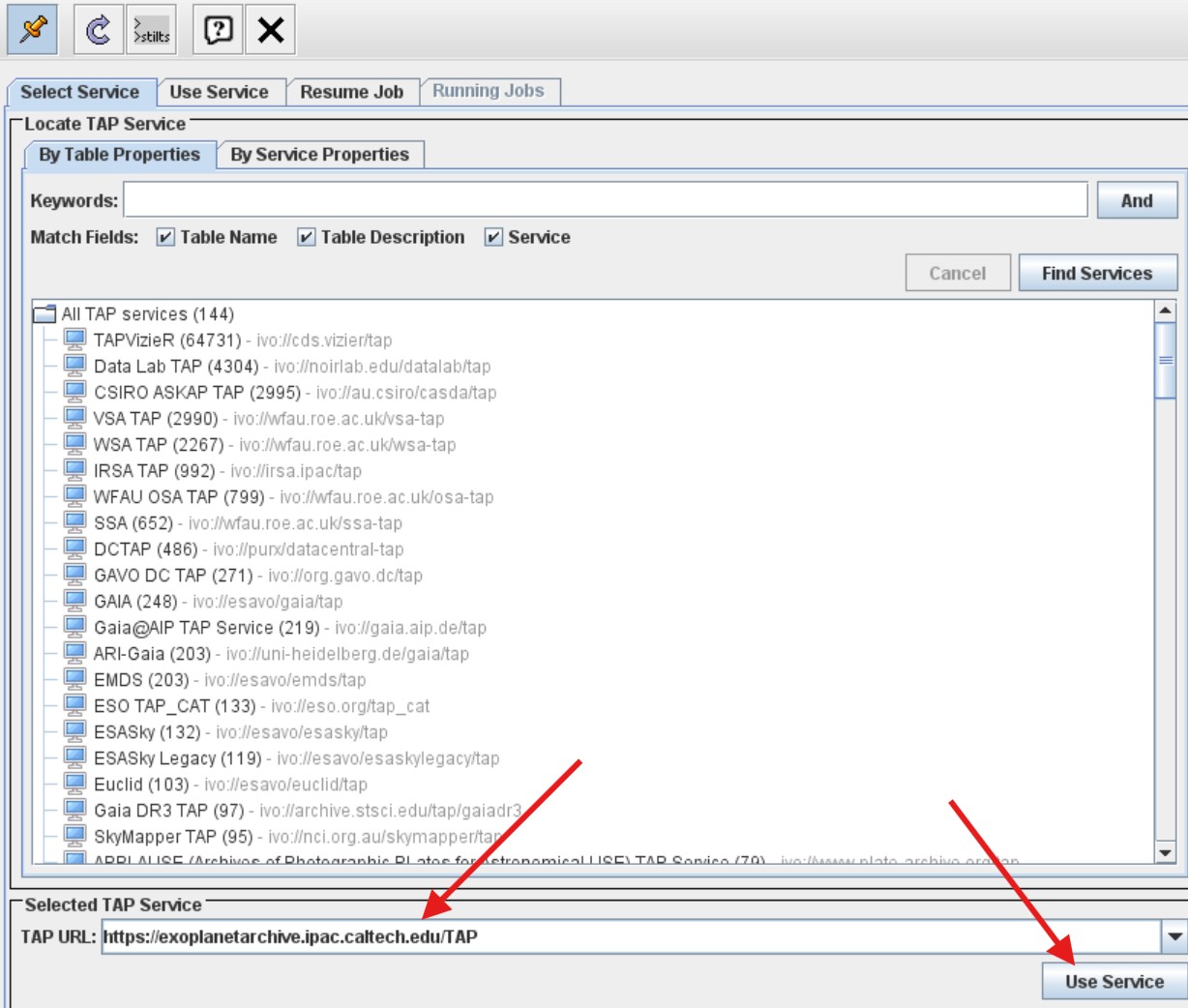
In the TAP Query Window, enter the following address in the TAP URL field:
https://exoplanetarchive.ipac.caltech.edu/TAP
Click Use Service.
3. Search for Exoplanet Transit Candidates
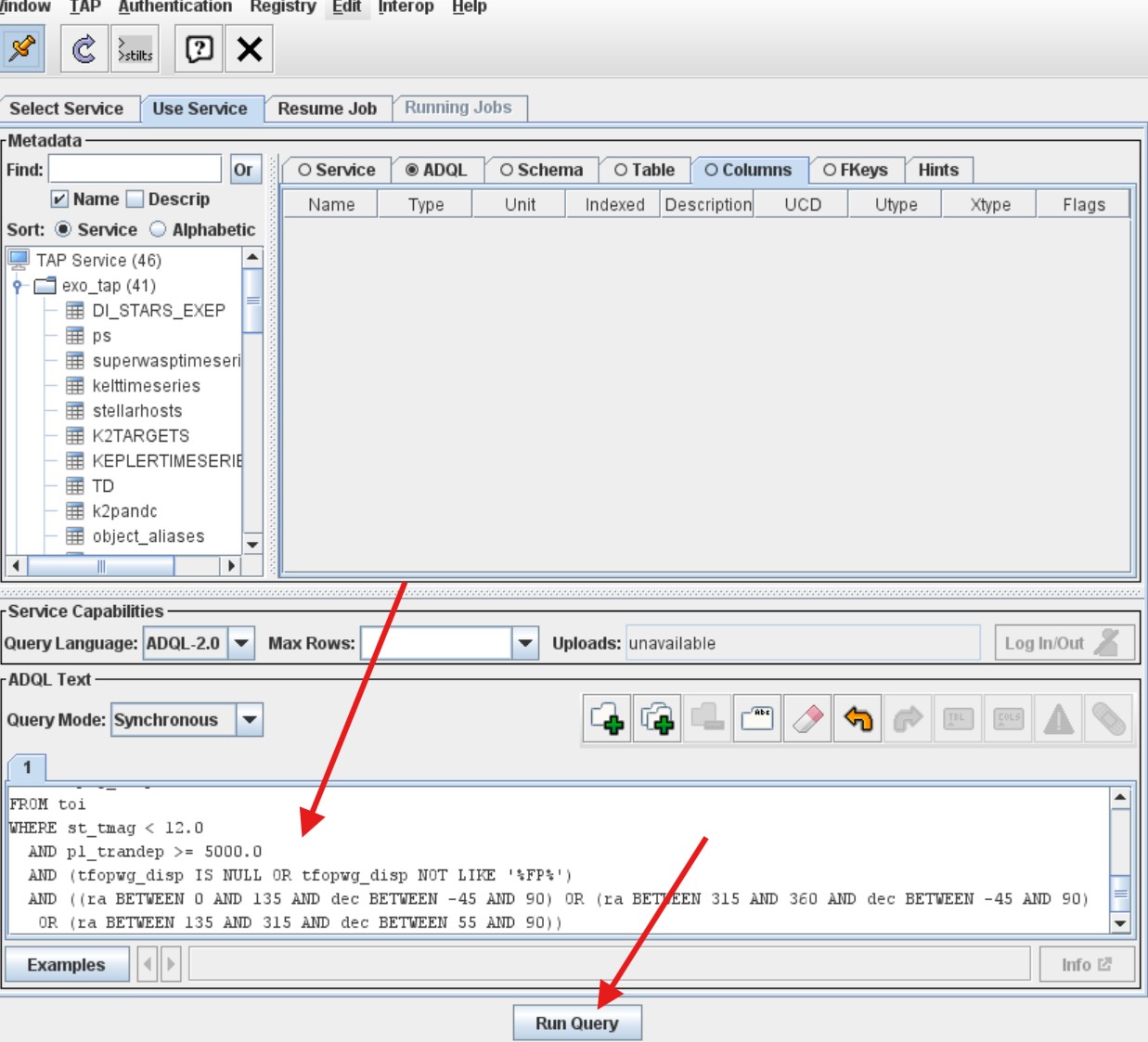
Enter the following ADQL query in the query window:
SELECT
    toi,
    tid,
    ra,
    dec,
    st_tmag,
    pl_trandep,
    pl_trandurh,
    pl_orbper,
    pl_rade,
    tfopwg_disp
FROM toi
WHERE st_tmag < 12.0
    AND pl_trandep >= 5000.0
    AND (tfopwg_disp IS NULL OR tfopwg_disp NOT LIKE '%FP%')
    AND (
        (ra BETWEEN 0 AND 135 AND dec BETWEEN -45 AND 90)
        OR
        (ra BETWEEN 315 AND 360 AND dec BETWEEN -45 AND 90)
        OR
        (ra BETWEEN 135 AND 315 AND dec BETWEEN 55 AND 90)
    )
This query searches the TESS Objects of Interest (TOI) catalog for transit candidates that satisfy the following conditions:
- Stellar magnitude: Brighter than magnitude 12 in the TESS band.
- Transit depth: At least 5000 ppm (0.5%).
- Disposition: Excludes objects explicitly marked as false positives.
- Sky position: Restricted to the specified ranges of right ascension and declination.
Important: Modify the RA and Dec ranges to select the region of the sky that will be visible from your observing location on your planned observing date.
Click Run Query.
4. Examine the Results
Open the resulting table and examine its columns.
You can sort the results by any column. For example, sorting by pl_trandurh allows you to organize the candidates according to their transit durations.

Meaning of the columns
| Column | Description | Units |
|---|---|---|
tid |
TESS Input Catalog identifier (TIC ID) | |
toi |
TESS Object of Interest identifier | |
ra |
Right ascension | degrees |
dec |
Declination | degrees |
st_tmag |
Stellar TESS magnitude | mag |
pl_trandep |
Planet transit depth | ppm |
pl_trandurh |
Planet transit duration | hours |
pl_orbper |
Planet orbital period | days |
pl_rade |
Planet radius | Earth radii |
tfopwg_disp |
TFOPWG disposition |
You can also examine the descriptions of the columns directly in TOPCAT by selecting Display Column Metadata in the main window.
Meaning of the disposition codes
The TESS Follow-up Observing Program Working Group (TFOPWG) assigns disposition codes to the candidates:
- PC — Planet Candidate: A promising candidate that still requires validation.
- CP — Confirmed Planet: A planet that has been confirmed.
- APC — Ambiguous Planetary Candidate: An object whose planetary nature remains uncertain.
- KP — Known Planet: A previously known planet.
- FA — False Alarm: A signal that is not considered a planetary transit.
Remember that not every object in the TOI catalog is a confirmed exoplanet.
5. Visualize the Candidates on the Sky
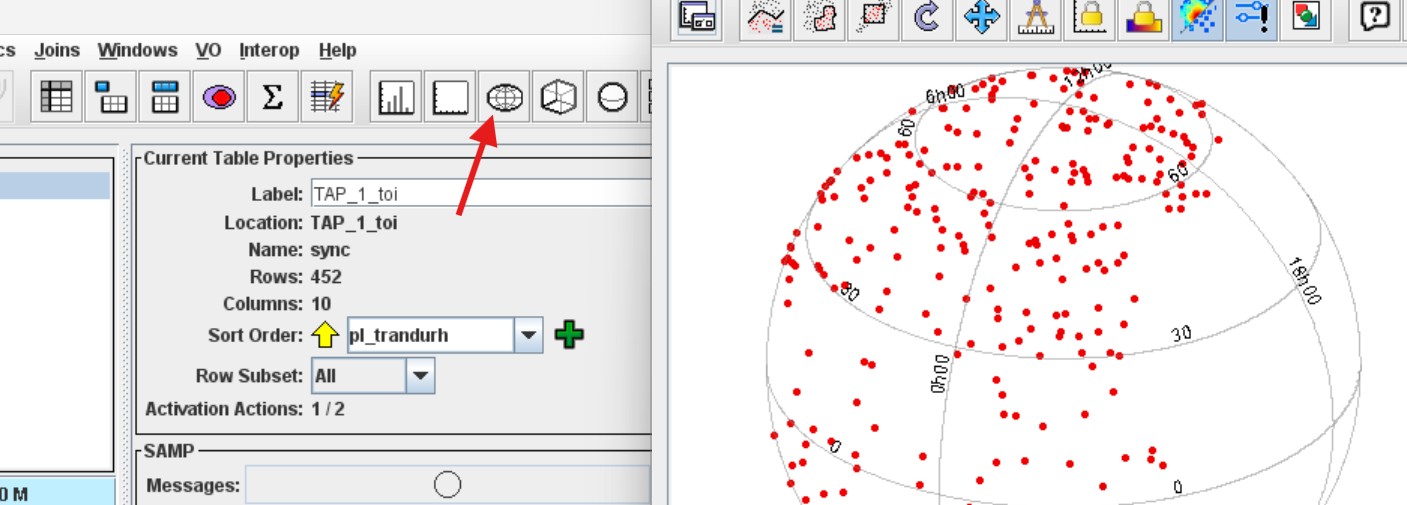
To see the spatial distribution of your candidates, open the Sky Plot in TOPCAT.
The plot shows the positions of the selected objects in the sky.
6. Examine the Distribution of Transit Parameters
TOPCAT also allows you to create histograms of the parameters in your results table.
For example, open the Histogram Plot and select pl_trandurh to examine the distribution of transit durations.
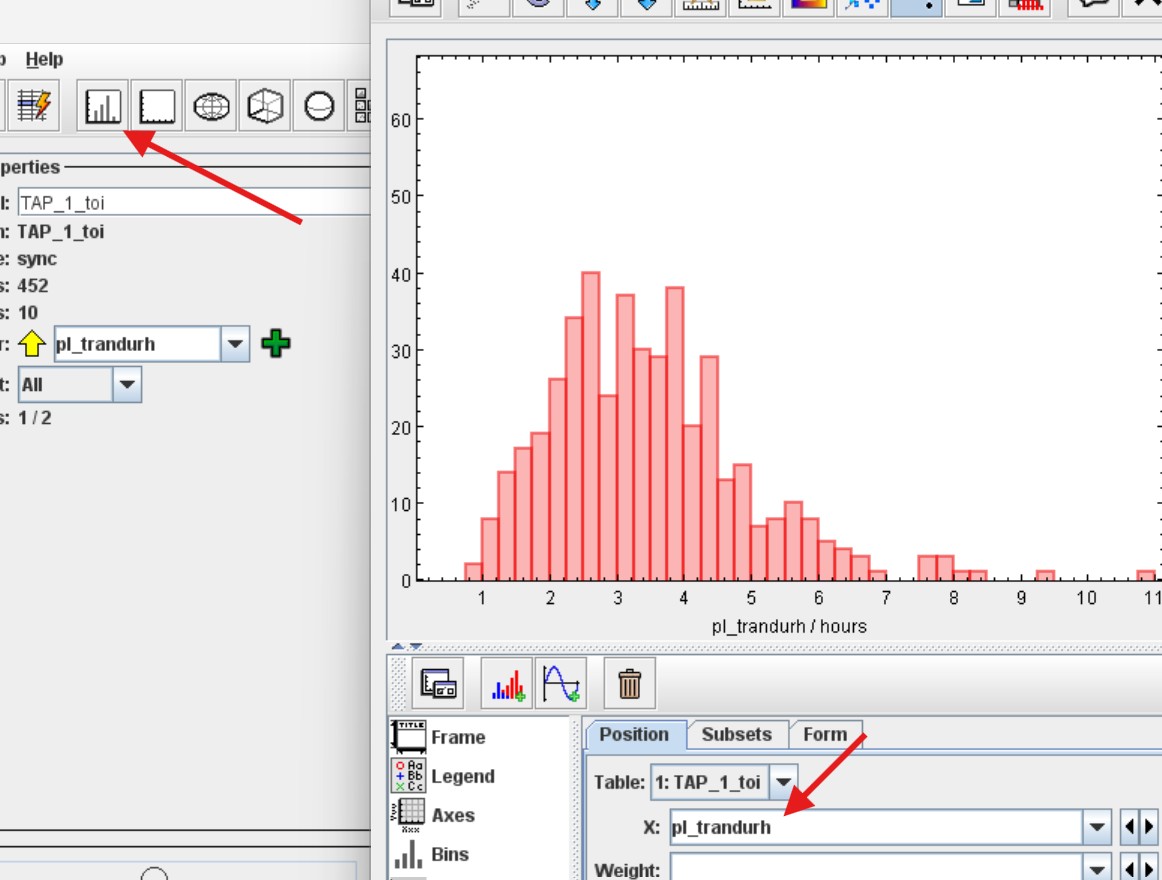
This is useful for identifying candidates with transit durations suitable for your available observing time.
7. Find the Next Transit of Your Selected Candidate
Once you have identified a promising candidate, you need to predict when its next transit will occur.
Open the NASA Exoplanet Archive in your browser.
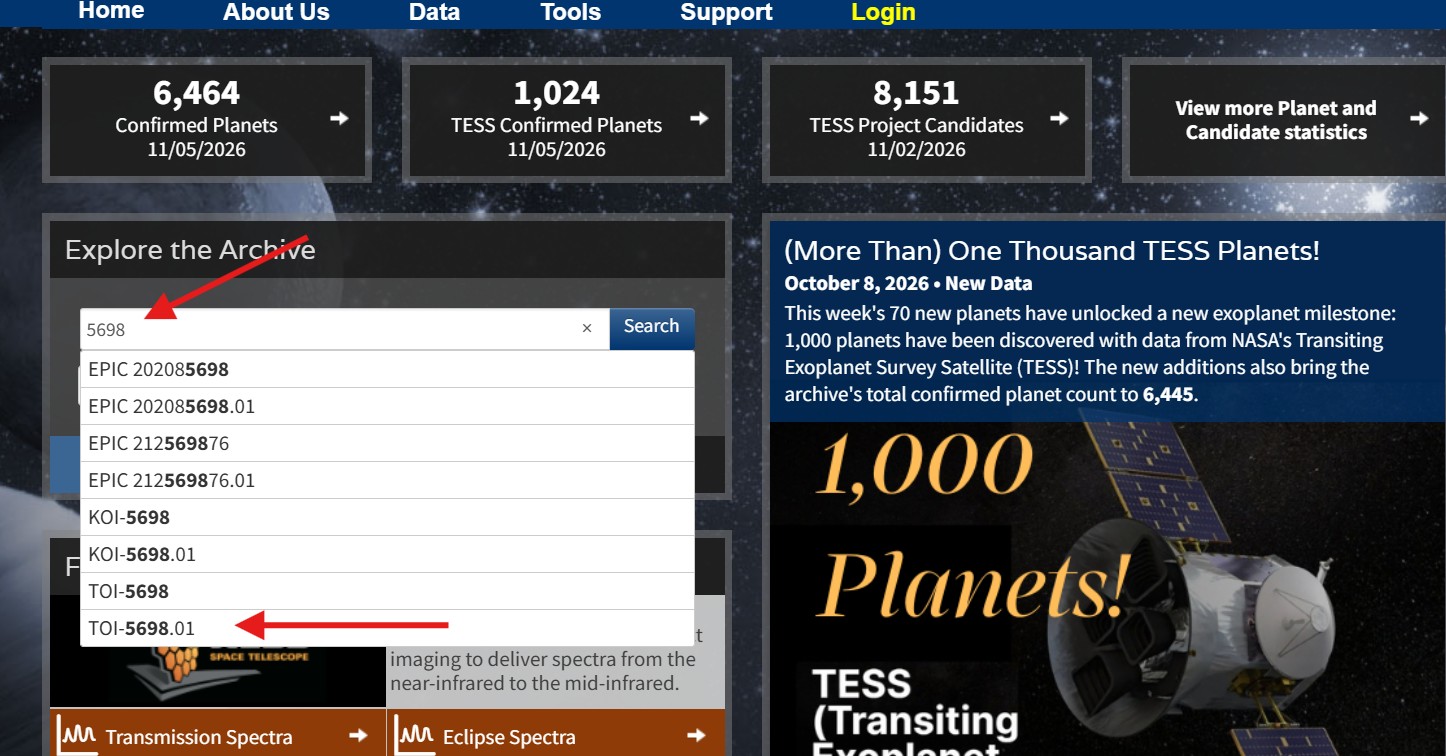
In the search field, start entering the TOI identifier from your results table.
For example, enter:
5698
When the autocomplete suggestions appear, select the full TOI identifier, such as TOI-5698.01, and click Search.
8. Open the Transit Prediction Service
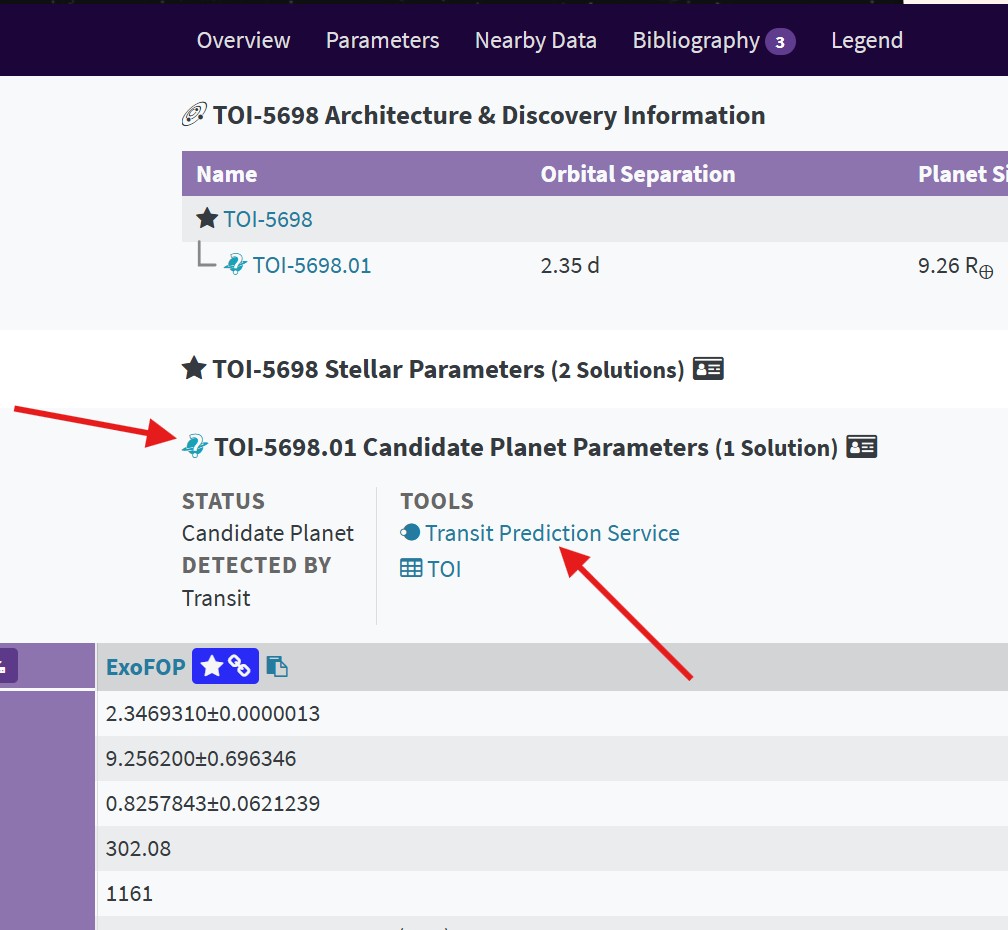
On the selected object’s page, expand the Candidate Planet Parameters section.
Find and click Transit Prediction Service.
9. Predict the Upcoming Transits
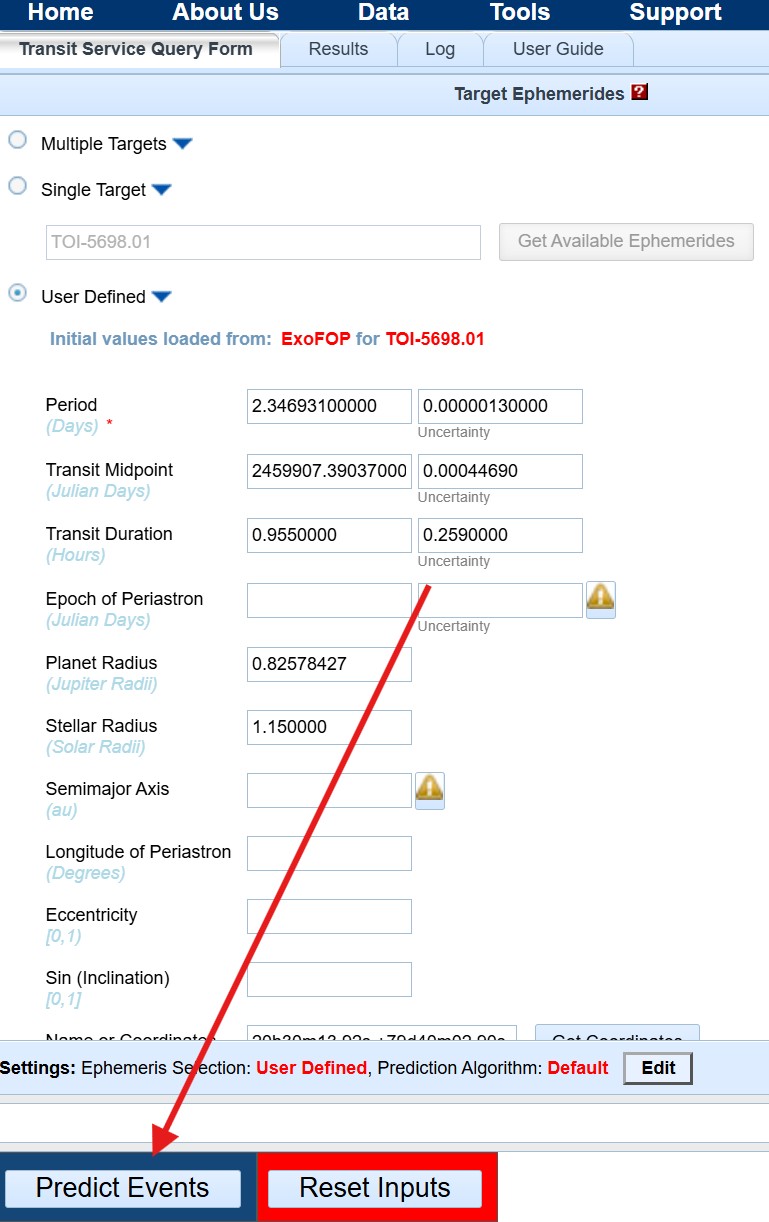
The Transit Prediction Service will automatically load the available orbital parameters for the selected object.
Review the parameters and click Predict Events.
10. Determine When to Observe
The prediction results contain the expected times of upcoming transits.
Scroll horizontally through the results table to find the Event Midpoint Calendar UT column.
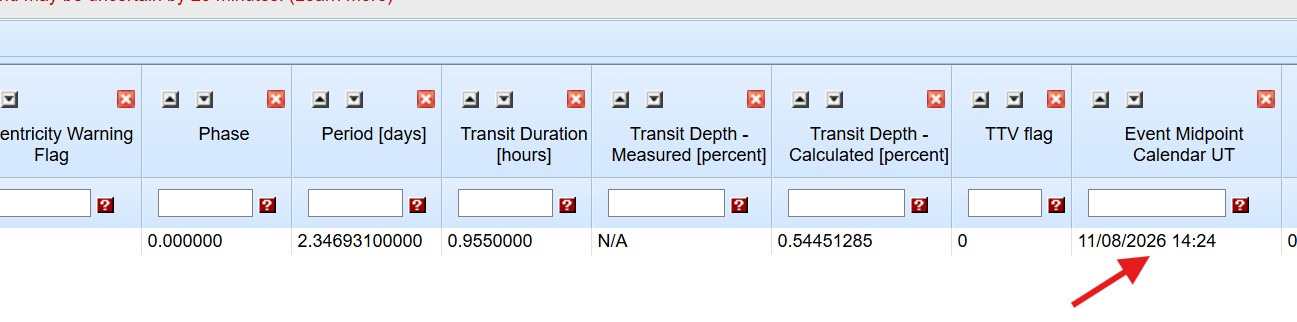
Important: The predicted times are given in Universal Time (UTC).
Convert the UTC date and time to your local time, taking into account your time zone and daylight saving time.
You can use an online UTC-to-local-time converter to make this conversion.
When planning your observation, remember that the predicted midpoint is the center of the transit. You should begin observing sufficiently early to capture the start of the transit and continue until after the transit ends.
You are now ready to schedule your exoplanet observations!
Additional Resources
There are several other useful websites for planning exoplanet transit observations:
-
UNISTELLAR Scientific Event Predictions:
https://science.unistellar.com/scientific-events-prediction/ -
Swarthmore Transit Finder:
https://astro.swarthmore.edu/transits/ -
AAVSO Target Tool:
https://targettool.aavso.org/ -
NASA Exoplanet Watch (Citizen Science):
https://science.nasa.gov/citizen-science/exoplanet-watch/exoplanet-watch-overview/